
GPA Calculator – Calculate Your GPA Fast & Accurately Online
Other Tools for GPA and Grade Planning
What Is a GPA Calculator?
If you want to know where you stand in your studies, a GPA calculator gives you a clear answer in seconds. It helps you understand your performance without doing any manual math or complex calculations.
A GPA calculator is a simple tool that converts your grades into numbers and then calculates your average score. You just enter your subjects, grades, and credit hours, and it shows your GPA instantly.
You can use the GPA calculator below to enter your grades and credit hours. Click calculate and get your GPA right away so you can track your progress easily.
Why GPA Is Important
Your GPA shows your overall academic performance in one number. It helps you understand whether you are doing well or need improvement in your studies.
Many universities and scholarship programs use GPA as a basic requirement. If your GPA is high, you have more options for admissions and financial support.
Checking your GPA regularly with a GPA calculator helps you stay aware of your progress. It also helps you plan better for future exams and goals.
How a GPA Calculator Works
A GPA calculator works by converting your grades into grade points and then calculating a weighted average. Each subject has a grade and credit hours, and both are used in the calculation.
The tool multiplies grade points by credit hours for each subject. Then it adds all values and divides them by the total credit hours to give your GPA.
You do not need to do this manually because the GPA calculator handles everything quickly. This reduces errors and gives you accurate results every time.
GPA Formula
The GPA calculator uses a standard formula to calculate your result. This formula includes total grade points and total credit hours.
GPA = Total Grade Points ÷ Total Credit Hours
Subjects with higher credit hours affect your GPA more. That is why entering correct credit hours is important when using a GPA calculator.
How to Use a GPA Calculator
Using a GPA calculator is simple and does not require any special knowledge. You only need basic information about your subjects and grades to get started.
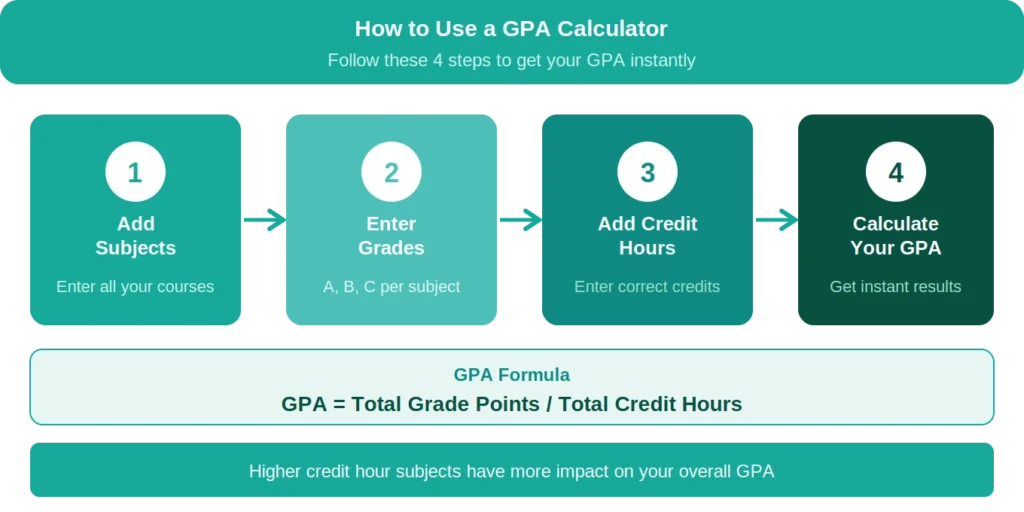
You can follow these steps and use the GPA calculator to check your result within seconds.
Step 1: Add Your Subjects
Start by entering all your subjects into the GPA calculator. Each subject should be added separately so the tool can calculate properly.
Make sure you include all subjects because missing even one can change your GPA. A complete list gives you an accurate result.
Step 2: Enter Your Grades
Enter the grades you received in each subject. These grades are usually in letter form like A, B, or C.
The GPA calculator converts these grades into points automatically. This makes the process easy and avoids confusion.
Step 3: Add Credit Hours
Each subject has credit hours that show its importance. You need to enter the correct value for each subject.
Subjects with more credit hours have more impact on your GPA, so accuracy in this step is important.
Step 4: Calculate Your GPA
After entering all details, click the calculate button. The GPA calculator will show your GPA instantly.
You can try different grade combinations to see how your GPA changes. This helps you set clear study goals.
GPA Scale
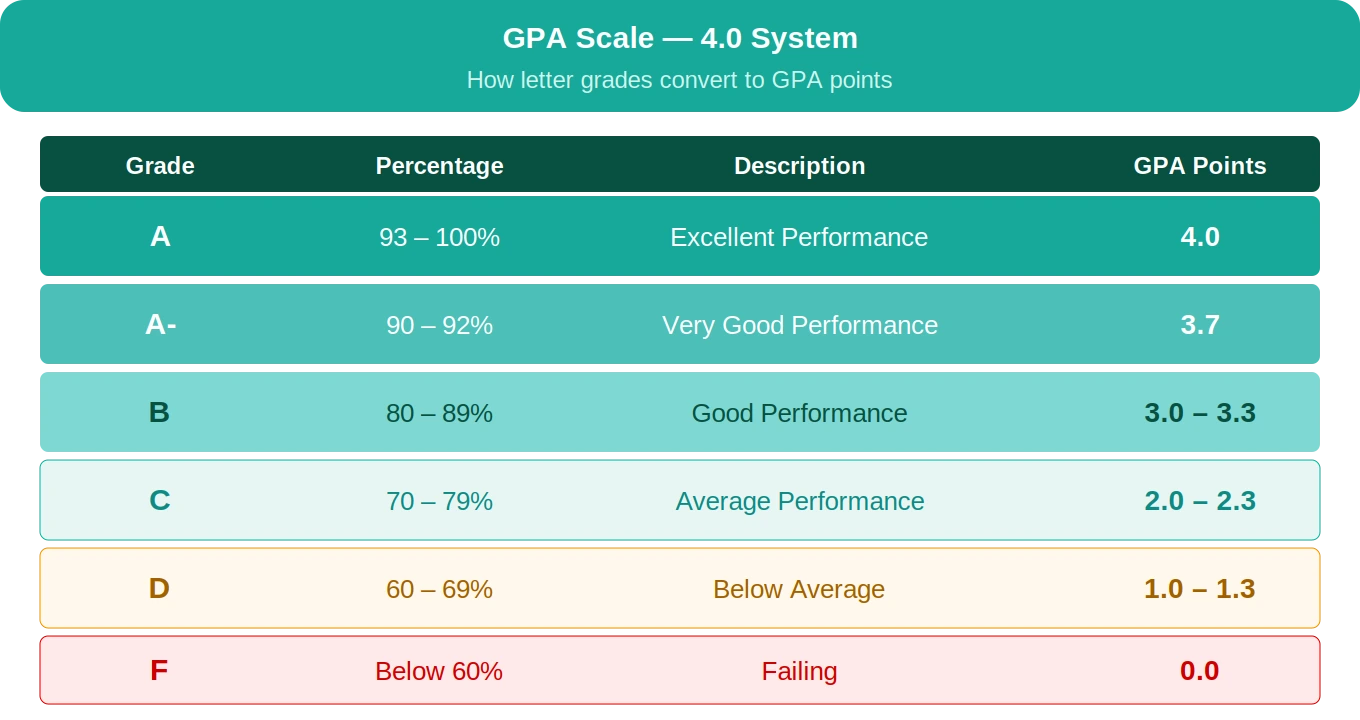
A GPA calculator works based on a grading scale, and the most common one is the 4.0 scale. This scale assigns a number value to each grade.
Understanding this scale helps you enter correct data and get accurate results. Some institutions may use slightly different grading systems.
4.0 Scale Example
In this scale, an A grade equals 4.0, while a B grade equals 3.0. Lower grades have lower values, and a failing grade has a value of 0.0.
Some schools also use plus and minus grades, which slightly adjust the value. This gives a more detailed calculation of GPA.
Types of GPA
There are different types of GPAs that students may need to calculate. A GPA calculator helps you calculate each type easily.
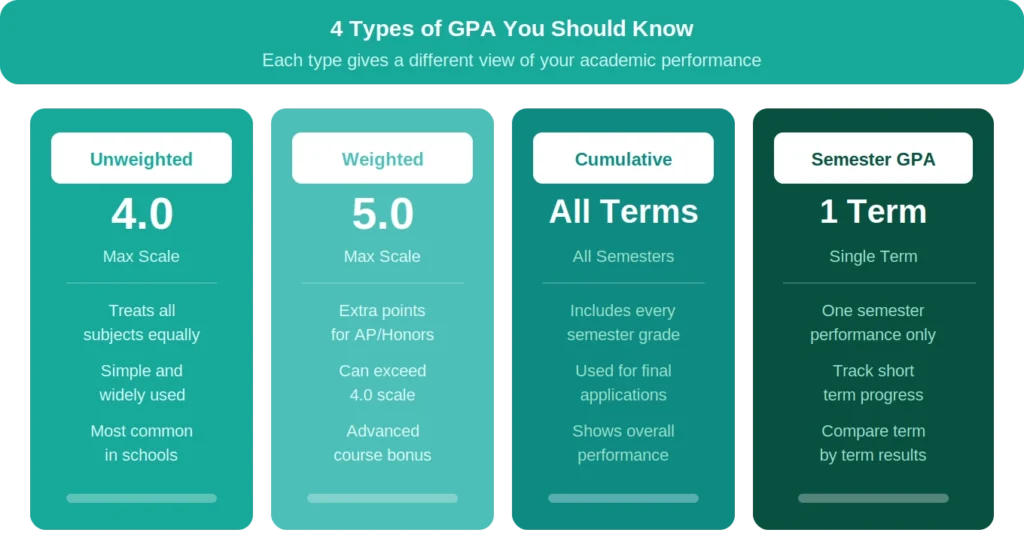
Each type shows a different view of your academic performance and helps you understand your results better.
Unweighted GPA
An unweighted GPA treats all subjects equally and does not consider difficulty level. It is simple and widely used in many schools.
This type gives a basic view of your academic performance.
Weighted GPA
Weighted GPA gives extra points for advanced or difficult subjects. This means your GPA can go higher than 4.0.
It is useful for students taking challenging courses.
Cumulative GPA
Cumulative GPA includes all your semesters and shows your overall performance. It is used for final results and applications.
Tracking this with a GPA calculator helps you stay aware of long-term progress.
Semester GPA
Semester GPA shows your performance for one term only. It helps you understand short-term results.
You can compare semester GPA to see improvement over time.
Benefits of Using a GPA Calculator
A GPA calculator makes grade calculation simple, fast, and accurate. It removes the need for manual work and gives instant results.
Using it regularly helps you stay updated about your performance and plan better.
Saves Time
Manual calculation can take time, especially when you have many subjects. A GPA calculator gives results within seconds.
This allows you to focus more on studying instead of calculations.
Reduces Errors
Manual calculations can lead to mistakes. A GPA calculator uses a fixed formula to avoid errors.
This ensures your GPA is always accurate.
Easy to Use
A GPA calculator is simple and user-friendly. You only need to enter basic details.
Anyone can use it without any difficulty.
Helps in Planning
You can test different grade scenarios using a GPA calculator. This helps you understand what grades you need.
It allows you to plan your study strategy better.
Example of GPA Calculation
Understanding a real example helps you see how a GPA calculator works in practice. It shows how grades and credit hours combine to form a final result.
For example, if you have three subjects with different grades and credit hours, each subject contributes based on its weight. Higher credit subjects affect the GPA more than lower ones.
When all grade points are added and divided by total credit hours, you get your GPA. The GPA calculator performs this entire process instantly without manual effort.
Tips to Improve Your GPA
Improving your GPA is possible with simple and consistent effort. You do not need complex methods, just regular focus and good habits.
Tracking your progress with a GPA calculator helps you stay motivated and see improvement over time.

Study Regularly
Studying daily helps you understand topics better and reduces pressure before exams.
It also improves your memory and leads to better grades.
Focus on Weak Subjects
Identify subjects where your grades are low and give them more time.
Improving weak areas can increase your overall GPA.
Manage Your Time
Create a study schedule and follow it daily. Divide your time based on subject importance.
Good time management helps improve performance.
Ask for Help
If you do not understand a topic, ask your teacher or classmates.
Getting help early makes learning easier.
Practice More
Practice regularly by solving questions and revising your notes.
This improves your understanding and exam performance.
Use Our Other Grade Tools
If you want to plan your grades better, you can also try our Final Grade Calculator. It helps you find what score you need in your final exam to reach your target grade.
Using both tools together makes it easier to manage your academic performance and set clear goals.
Final Thoughts
A GPA calculator is a simple and useful tool for students. It helps you understand your academic performance quickly and clearly.
Use the GPA calculator regularly to track your progress and plan your goals. Small improvements over time can lead to better results.